> ## Documentation Index
> Fetch the complete documentation index at: https://lago-ftr-wallet-improvements.mintlify.site/llms.txt
> Use this file to discover all available pages before exploring further.
# Invoice collection
**PREMIUM FEATURE** ✨
This dashboard is only available to users with a premium license. Please
**[contact us](mailto:hello@getlago.com)** to get access to Lago Cloud and Lago
Self-Hosted Premium.
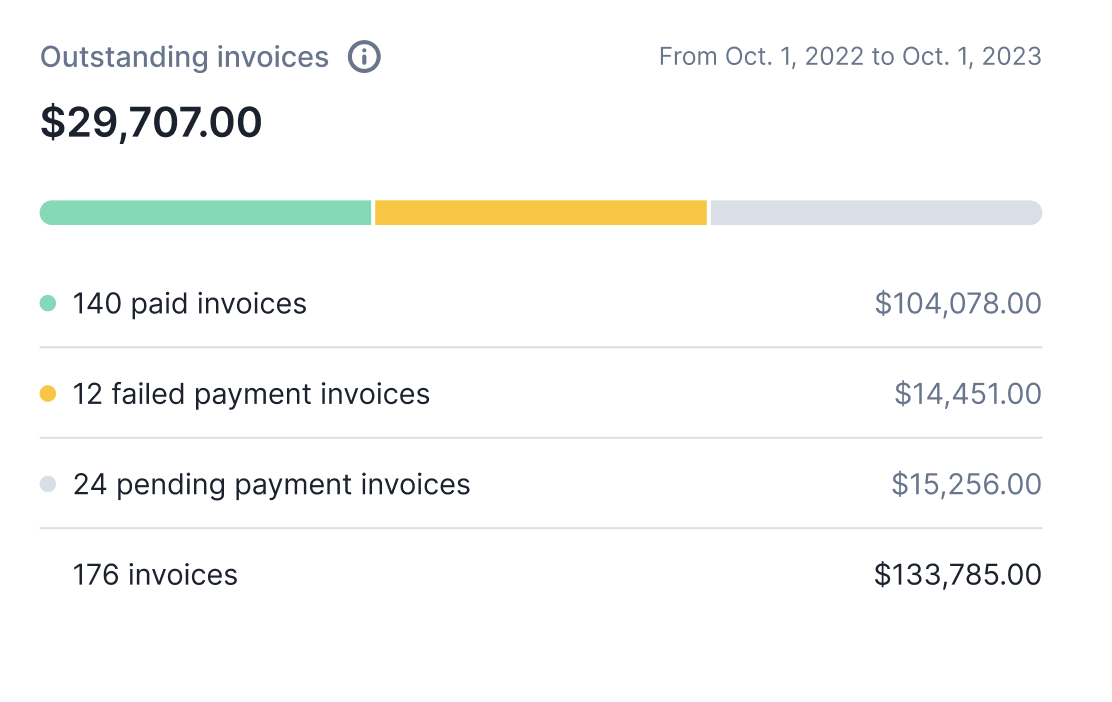
Our dashboard empowers you with insights into the number of invoices and their respective values across all payment statuses.
This means you can easily track the count of invoices with failed, pending, or successful payment statuses and ease your collection.
By simply clicking on any of the rows, you can gain access to a detailed list of invoices categorized by their status.
This feature proves valuable when you need to initiate a new payment intent or take specific actions related to invoice management.
To access the Invoice collection analytics dashboard:
1. Navigate to the "Analytics" section; and
2. Access the "Outstanding invoices" Dashboard.
 ```bash Get Oustanding Invoices
LAGO_URL="https://api.getlago.com"
API_KEY="__YOUR_API_KEY__"
curl --location --request GET "$LAGO_URL/api/v1/analytics/invoice_collection?currency=USD" \
--header "Authorization: Bearer $API_KEY" \
--header 'Content-Type: application/json' \
```
The generated amounts are in cents, making it compatible with different currencies.
```sql SQL Query used by Lago
--- Get start date of the organization
WITH organization_creation_date AS (
SELECT
DATE_TRUNC('month', o.created_at) AS start_month
FROM organizations o
WHERE o.id = '__YOUR_ORGANIZATION_ID__'
)
--- Generate a series of months
, all_months AS (
SELECT
generate_series(
(SELECT start_month FROM organization_creation_date),
DATE_TRUNC('month', CURRENT_DATE + INTERVAL '10 years'),
interval '1 month'
) AS month
)
--- Get invoice number and value per status
,invoices_per_status AS (
SELECT
DATE_TRUNC('month', i.issuing_date) AS month,
i.currency,
CASE
WHEN i.payment_status = 0 THEN 'pending'
WHEN i.payment_status = 1 THEN 'paid'
WHEN i.payment_status = 2 THEN 'failed'
END AS payment_status,
COALESCE(COUNT(*), 0) AS number_invoices,
COALESCE(SUM(i.total_amount_cents::float), 0) AS amount_cents
FROM invoices i
WHERE i.organization_id = '__YOUR_ORGANIZATION_ID__'
AND i.status = 1 --- ONLY FINALIZED INVOICES
GROUP BY payment_status, month, currency
)
--- Get invoice total and amount per status per month till the current month
SELECT
am.month,
payment_status,
currency,
COALESCE(number_invoices, 0) AS number_invoices,
COALESCE(amount_cents, 0) AS amount_cents
FROM all_months am
LEFT JOIN invoices_per_status ips ON ips.month = am.month AND ips.payment_status IS NOT NULL
WHERE am.month <= DATE_TRUNC('month', CURRENT_DATE)
AND payment_status IS NOT NULL
---AND currency = '' --- Filter by currency if needed
ORDER BY am.month, payment_status, currency;
```
```bash Get Oustanding Invoices
LAGO_URL="https://api.getlago.com"
API_KEY="__YOUR_API_KEY__"
curl --location --request GET "$LAGO_URL/api/v1/analytics/invoice_collection?currency=USD" \
--header "Authorization: Bearer $API_KEY" \
--header 'Content-Type: application/json' \
```
The generated amounts are in cents, making it compatible with different currencies.
```sql SQL Query used by Lago
--- Get start date of the organization
WITH organization_creation_date AS (
SELECT
DATE_TRUNC('month', o.created_at) AS start_month
FROM organizations o
WHERE o.id = '__YOUR_ORGANIZATION_ID__'
)
--- Generate a series of months
, all_months AS (
SELECT
generate_series(
(SELECT start_month FROM organization_creation_date),
DATE_TRUNC('month', CURRENT_DATE + INTERVAL '10 years'),
interval '1 month'
) AS month
)
--- Get invoice number and value per status
,invoices_per_status AS (
SELECT
DATE_TRUNC('month', i.issuing_date) AS month,
i.currency,
CASE
WHEN i.payment_status = 0 THEN 'pending'
WHEN i.payment_status = 1 THEN 'paid'
WHEN i.payment_status = 2 THEN 'failed'
END AS payment_status,
COALESCE(COUNT(*), 0) AS number_invoices,
COALESCE(SUM(i.total_amount_cents::float), 0) AS amount_cents
FROM invoices i
WHERE i.organization_id = '__YOUR_ORGANIZATION_ID__'
AND i.status = 1 --- ONLY FINALIZED INVOICES
GROUP BY payment_status, month, currency
)
--- Get invoice total and amount per status per month till the current month
SELECT
am.month,
payment_status,
currency,
COALESCE(number_invoices, 0) AS number_invoices,
COALESCE(amount_cents, 0) AS amount_cents
FROM all_months am
LEFT JOIN invoices_per_status ips ON ips.month = am.month AND ips.payment_status IS NOT NULL
WHERE am.month <= DATE_TRUNC('month', CURRENT_DATE)
AND payment_status IS NOT NULL
---AND currency = '' --- Filter by currency if needed
ORDER BY am.month, payment_status, currency;
```